
2026-02-08 — LibraStudio Dev Log #1
Background
Why Another .NET IDE?
The IDE options in the .NET ecosystem are actually quite limited. Visual Studio is powerful but Windows-only, and even the Community Edition has restrictions on commercial use. The VS Code + C# Dev Kit combo is great, but the fact that C# Dev Kit is proprietary doesn’t change. Ultimately, vendor lock-in occurs at critical points, and the entire tool chain and workflow built on top becomes dependent on a specific vendor’s decisions.
In the past, SharpDevelop filled that role on Windows, and MonoDevelop (Xamarin Studio) did so cross-platform. But SharpDevelop ceased development in 2017, and MonoDevelop effectively ended its life as a standalone IDE after being absorbed into Xamarin. Since then, no open-source, liberally-licensed, cross-platform IDE that properly supports modern .NET (post-Core) development has emerged.
This has always been frustrating. That’s why I started LibraStudio. The goal is a pure .NET native IDE — not based on Electron or VS Code. I’m obviously not trying to build a Visual Studio-level IDE alone. But in 2026, you can leverage the power of AI-based code editors. Have AI agents explore framework APIs, generate boilerplate, and handle repetitive implementations — the scope a single person can manage is completely different from the past.
For the UI framework, I use Aprillz.MewUI. It’s NativeAOT-friendly and a lightweight framework that builds UI purely with C# code, without XAML. This framework is an open-source project by Youngjae Song, who is active in DotNetDev (.NET Dev, https://forum.dotnetdev.kr/), one of Korea’s leading .NET developer communities, alongside myself.
The Challenge of a Framework AI Has Never Seen
MewUI is a brand-new UI framework with a completely novel concept. Unlike XAML-based frameworks like WPF or AvaloniaUI, it takes a unique approach of building UI purely through C# fluent APIs. Naturally, official documentation isn’t abundant, and there aren’t piles of related questions on Stack Overflow.
This is compounded by the .NET platform itself. In LLM training data, .NET/C# has relatively lower training frequency compared to JavaScript or Python ecosystems. Even major frameworks like WPF or WinForms sometimes produce inaccurate code — the chances of getting MewUI’s APIs right, when they’re virtually absent from training data, are extremely low.
In this situation, what happens when you ask an AI coding agent to “build a minimal tab-based text editor”?
The Typical Approach: Guessing and Iterating
A typical AI coding agent workflow goes like this:
- Recall similar APIs from training data and write code
- Build
- If errors occur, read the error messages and fix
- Repeat steps 2–3
This approach works well with major frameworks richly represented in training data (WPF, React, SwiftUI, etc.). But with a brand-new framework like MewUI — built on .NET, which already has relatively lower training frequency — the accuracy of guesses is extremely low. Method names, parameter order, overload existence, event signatures — everything can be off.
A Different Approach: Inspecting the Assembly Directly
For this project, I used HandMirror MCP, which I created myself. HandMirror is an MCP (Model Context Protocol) server that directly inspects compiled assemblies from NuGet packages.
Instead of searching web documentation, it analyzes the actual .dll and returns the following information. Notably, HandMirror doesn’t use standard .NET reflection (System.Reflection) — it uses Mono.Cecil. Cecil reads .NET assembly metadata directly without runtime loading, so it’s unaffected by the target assembly’s .NET runtime version. Whether it’s a .NET Framework 4.x library or a .NET 10 target, it can analyze them equally:
- All namespaces and type listings
- Constructor, property, method, and event signatures for each type
- Which namespace extension methods belong to
- Inheritance hierarchies
Information Actually Obtained
Inspecting Aprillz.MewUI v0.9.1 revealed:
- 178 public types across 14 namespaces
- That
MultiLineTextBoxinherits fromTextBaseand has properties likeText,Placeholder,AcceptTab,Wrap,IsReadOnly - That
TabControl.SelectionChangedisAction<int>(without documentation, the guess would have beenAction<TabItem>— and indeed it was) - That
FileDialog.OpenFile()takesOpenFileDialogOptionswith properties likeTitle,Filter,Owner - That
Menu.Item()andContextMenu.Item()have different overloads —Menu.Itemhas no shortcut string parameter - That
ObservableValue<T>hasSubscribe(),NotifyChanged(), andSet()methods
With just this information, I could write the editor’s core code with near-perfect accuracy.
Result: 3 Errors on First Build
After writing the entire codebase, only 3 errors occurred on the first build:
| Error | Cause |
|---|---|
Menu.Item("text", "shortcut", action) — no such overload | Used a shortcut parameter that only exists in ContextMenu.Item |
BorderThickness(0, 1, 0, 0) — no 4-parameter overload | Only BorderThickness(double) single parameter exists |
SelectionChanged type mismatch | HandMirror reported Action<int>, but I accidentally wrote Action<TabItem> in code |
The third was purely a mistake in transcribing information I’d already read correctly. The information HandMirror provided was accurate.
After fixing these 3 errors, the build succeeded and the app ran normally.
What If I Hadn’t Used HandMirror?
For comparison, here’s the estimated scenario if I’d done the same work without HandMirror:
- Knowing that a
MultiLineTextBoxcontrol exists is possible since it’s documented in AGENTS.md - But what’s the exact method name for the fluent API? Is it
BindText,SetText, orTextBinding? - Does a
FileDialogAPI exist, and if so, what does it look like? - What’s the event signature for
TabControl? - What’s the subscription mechanism for
ObservableValue<T>?
All of these would have required cycles of guess → build → error → fix. Exploring an API surface spanning 178 types through trial and error is inefficient.
Takeaways
1. “Frameworks AI has never trained on” are a weakness of AI agents — but one that tools can overcome
Large language models remember what’s in their training data well. For frameworks richly represented in JavaScript/Python ecosystems, they generate fairly accurate code. But for a brand-new framework on a platform with relatively lower training frequency like .NET? They can only guess, and guesses are likely wrong. But with tools that inspect actual binaries, this weakness is compensated for.
2. Mistakes happen even with accurate information
HandMirror accurately told me that SelectionChanged is Action<int>, but during coding I accidentally typed Action<TabItem>. The accuracy of tool-provided information and the accuracy of applying that information to code are separate concerns.
3. The Power of the MCP Ecosystem
HandMirror is implemented as an MCP (Model Context Protocol) server. Thanks to this protocol, AI agents can dynamically acquire knowledge that didn’t exist at training time during runtime. This isn’t just a tool — it’s infrastructure that extends the capability boundaries of AI agents.
Currently HandMirror specializes in .NET assemblies, but future extensions are under consideration. For example, inspecting Java .class/.jar files via IKVM, or analyzing native library symbol tables — if AI agents could explore API surfaces beyond the .NET ecosystem, they could generate accurate code in the same way for projects running on polyglot runtimes.
4. With AI Agents, the Limits of Solo Development Change
Projects like SharpDevelop and MonoDevelop were built by dozens of contributors over several years. In 2026, AI agents handle API exploration, boilerplate generation, and repetitive implementation. Architecture decisions and quality judgment are still human responsibilities, but the bottleneck of physically typing code has been greatly reduced. The dream of an open-source IDE can now begin as a single person’s side project.
Getting Started with HandMirror MCP
HandMirror MCP is published on NuGet, and the source code is available on GitHub. It requires .NET 8.0 SDK or later.
Installation & Setup
Since it’s published on NuGet, you can run it directly with the dnx command — no source code build required.
VS Code (GitHub Copilot) — add to your workspace’s .vscode/mcp.json:
{
  "servers": {
    "HandMirrorMcp": {
      "type": "stdio",
      "command": "dnx",
      "args": ["HandMirrorMcp", "--yes"]
    }
  }
}
Claude Desktop — add to your config file (%APPDATA%\Claude\claude_desktop_config.json):
{
  "mcpServers": {
    "handmirror": {
      "command": "dnx",
      "args": ["HandMirrorMcp", "--yes"]
    }
  }
}
To build from source instead:
git clone https://github.com/rkttu/HandMirrorMcp.git
cd HandMirrorMcp
dotnet build
dotnet run --project HandMirrorMcp
Key Usage
Once connected to an MCP client, you can analyze .NET assemblies simply by asking in natural language:
- Inspect packages: “Show me the namespaces and types in the Aprillz.MewUI package”
- Type details: “Tell me the properties and methods of the MultiLineTextBox class”
- Resolve build errors: “I’m getting CS0246 — find the NuGet package that provides this type”
- Check vulnerabilities: “Check if System.Text.Json 6.0.0 has any known security vulnerabilities”
- Project analysis: “Analyze my .csproj file and identify any issues”
Using Together with Microsoft Learn MCP
While HandMirror provides exact API signatures from compiled assemblies, Microsoft Learn MCP Server brings official Microsoft documentation directly to AI agents. It enables document search, full article retrieval, and code sample search — available as a free remote MCP server with no authentication required.
Using both tools together significantly improves the key weaknesses AI agents exhibit in .NET development:
- HandMirror: Identifies exact types, method signatures, and namespaces from actual compiled assemblies
- Microsoft Learn MCP: Provides usage patterns, best practices, and troubleshooting guides from official documentation
With both “what the API looks like” (HandMirror) and “how to use it” (Microsoft Learn MCP) available simultaneously, guesswork caused by training data limitations can be minimized.
What Was Built
With assistance from HandMirror MCP, I was able to build a minimal text editor based on MewUI, establishing the skeleton shown in the image below.
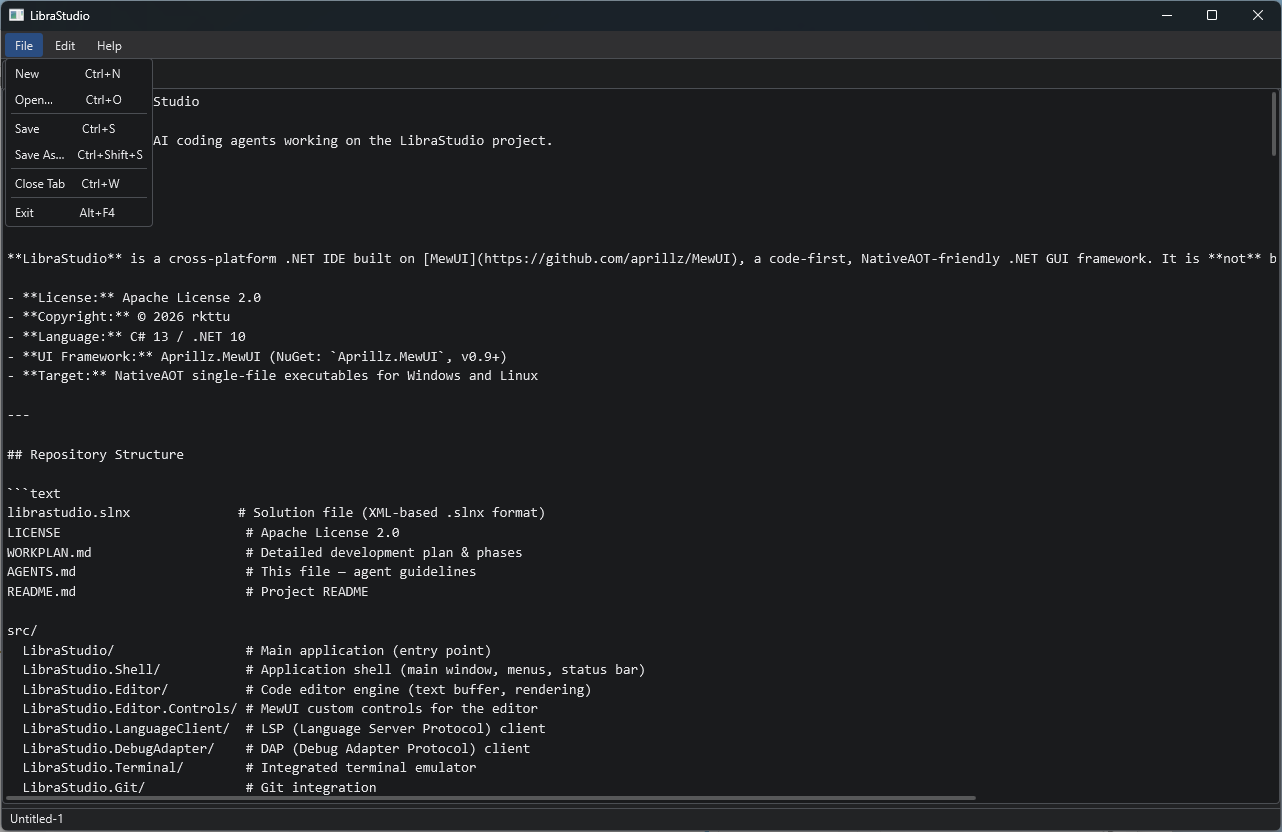
LibraStudio is under development with the Apache License 2.0. © 2026 rkttu
src/LibraStudio.Common/         # File I/O utilities
src/LibraStudio.Editor/         # Editor tab model + tab manager
src/LibraStudio.Shell/          # Menu bar, status bar, keyboard shortcut integration
Features:
MultiLineTextBox-based tab editor (Consolas, monospace)- File menu: New / Open / Save / Save As / Close Tab / Exit
- Keyboard shortcuts:
Ctrl+N,Ctrl+O,Ctrl+S,Ctrl+Shift+S,Ctrl+W - OS-native file dialogs (Win32)
- Change detection (dirty state) →
•indicator on tab header - Save confirmation dialog when closing tabs
- Current file path displayed in status bar
There’s no syntax highlighting yet, no line numbers, and no find/replace. But it functions as a minimal text editor that can open, edit, and save files.
Tech Stack
| Item | Value |
|---|---|
| Language | C# 13 / .NET 10 |
| UI | Aprillz.MewUI 0.9.1 |
| Graphics | Direct2D (Windows) |
| Theme | Dark + Blue accent |
| Build | NativeAOT target (PublishAot=true) |
| AI Tools | GitHub Copilot (Claude) + HandMirror MCP |
